
How to Purchase Credits

AlertBrew uses a simple credit-based pricing system with no subscriptions or hidden fees. You only pay for the credits you use.
New workspaces receive 2,500 free credits, so you can start creating and running alerts immediately. When your balance becomes low, you can purchase additional credits directly from your dashboard.
How AlertBrew Credits Work
Credits are used when AlertBrew runs intelligent searches and generates optional AI insights.
An intelligent search typically uses around 100 credits, although the exact amount may vary depending on the selected data source.
The default summary included with a triggered alert is free. Custom AI insights cost 100 credits each time they are generated for a triggered alert.
1. Locate Your Credit Balance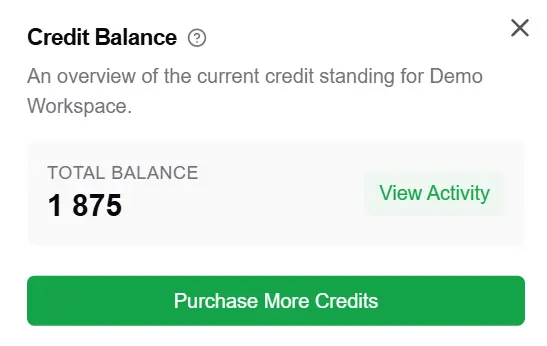
Open your AlertBrew dashboard and look at the top navigation bar.
Your current balance appears next to the diamond icon.
2. Open the Purchase Menu
Click the diamond icon or your current credit balance.
The purchase window will show the available credit amount, price, and credit options.
3. Choose a Credit Option
Select the number of credits you want to purchase, then choose the option that best matches your expected usage.
Standard Credits
Standard credits are designed for occasional or experimental monitoring.
They remain valid for 24 months, giving you more time to use your balance.
Short-Term Credits
Short-Term credits include a 1.5x bonus and are designed for more predictable or frequent usage.
These credits remain valid for 60 days.
Make sure to review the validity period before completing your purchase. Credits with a shorter validity period should be used before they expire.
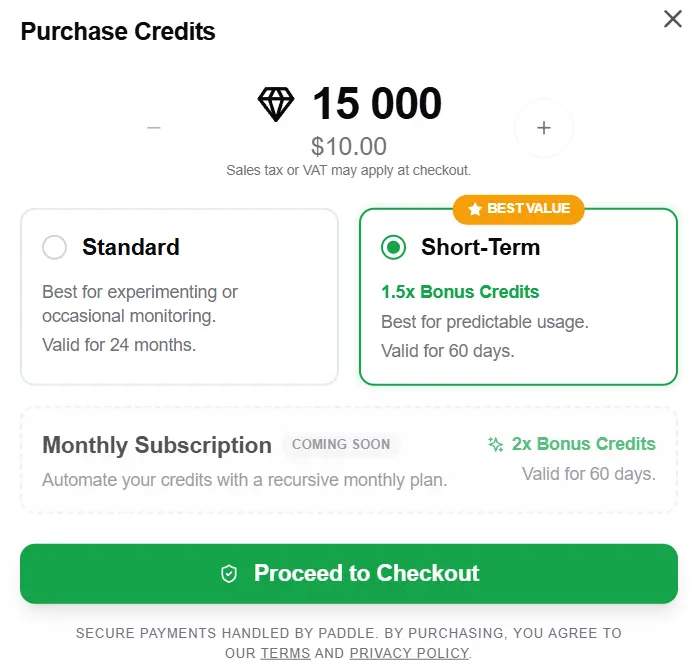
4. Complete Your Purchase
Click Proceed to Checkout.
You will be redirected to Paddle, AlertBrew's secure payment processor, where you can complete the transaction. Major credit cards and PayPal are accepted.
Once the payment is completed, the credits will be added to your workspace balance immediately.
If any alerts were paused because your balance was too low, they can resume after sufficient credits have been added.
Important Payment Information
All payments are processed by Paddle, our Merchant of Record.
AlertBrew does not collect or store your credit card information. Taxes or VAT may apply depending on your location.